TECHFUND
Media


Assembling back from bytecode
Author: Ravi Kiran Betha
This article is a simple exercise about reverse engineering the smart contract code from bytecode and try executing a function in the byte code.
The key focus of this article is to develop the understanding on how to read and interpret the bytecode. We can start by looking at a bytecode for a contract deploy on ether scan, but it would essentially turnout to be like a CTF and is much more challenging.
As a learning and simpler verification process, the approach I took is to build a simple smart contract in Solidity on Remix, generate the bytecode. Once we have the bytecode, we start focusing on how to build back the understanding of the solidity code. This exercise will help us develop a good basic understanding and better prepare us to explore bytecodes for contracts deployed on Ether scan.
Solidity Contract
// SPDX-License-Identifier: GPL-3.0

pragma solidity 0.8.25;

contract SimpleContract {
    mapping(address => uint256) public myMap;

    function get(address _addr) public view returns (uint256) {
        return myMap[_addr];
    }

    function set(address _addr, uint256 _i) public {
        myMap[_addr] = _i;
    }

    function remove(address _addr) public {
        delete myMap[_addr];
    }
}
The above contract has a map to store uint value for an address. It has three functions to set, get and remove the mapping respectively.
Disassembly
Disassembly is the process of decoding the hexadecimal string into something slightly more understandable. In this process, we look at instructions in hex to build back the flow. Luckily, we have tools to help with. decompiler
Generate Byte code
In order to generate the byte code, copied the code to a file in remix and compiled it. Under artifacts, a json file is generated as a result of compilation.
On inspecting the contents of the file, we can see two bytecodes.
1) bytecode
6080604052348015600e575f80fd5b5061031e8061001c5f395ff3fe608060405234801561000f575f80fd5b506004361061004a575f3560e01c806327cbd5291461004e57806329092d0e1461007e5780633825d8281461009a578063c2bc2efc146100b6575b5f80fd5b61006860048036038101906100639190610224565b6100e6565b6040516100759190610267565b60405180910390f35b61009860048036038101906100939190610224565b6100fa565b005b6100b460048036038101906100af91906102aa565b61013c565b005b6100d060048036038101906100cb9190610224565b610181565b6040516100dd9190610267565b60405180910390f35b5f602052805f5260405f205f915090505481565b5f808273ffffffffffffffffffffffffffffffffffffffff1673ffffffffffffffffffffffffffffffffffffffff1681526020019081526020015f205f905550565b805f808473ffffffffffffffffffffffffffffffffffffffff1673ffffffffffffffffffffffffffffffffffffffff1681526020019081526020015f20819055505050565b5f805f8373ffffffffffffffffffffffffffffffffffffffff1673ffffffffffffffffffffffffffffffffffffffff1681526020019081526020015f20549050919050565b5f80fd5b5f73ffffffffffffffffffffffffffffffffffffffff82169050919050565b5f6101f3826101ca565b9050919050565b610203816101e9565b811461020d575f80fd5b50565b5f8135905061021e816101fa565b92915050565b5f60208284031215610239576102386101c6565b5b5f61024684828501610210565b91505092915050565b5f819050919050565b6102618161024f565b82525050565b5f60208201905061027a5f830184610258565b92915050565b6102898161024f565b8114610293575f80fd5b50565b5f813590506102a481610280565b92915050565b5f80604083850312156102c0576102bf6101c6565b5b5f6102cd85828601610210565b92505060206102de85828601610296565b915050925092905056fea2646970667358221220e5d9bd33d378443e6559d0b55a41a52833081937ceeefb7aaf24e5ea8862eb9564736f6c63430008190033
2) deployedBytecode
608060405234801561000f575f80fd5b506004361061004a575f3560e01c806327cbd5291461004e57806329092d0e1461007e5780633825d8281461009a578063c2bc2efc146100b6575b5f80fd5b61006860048036038101906100639190610224565b6100e6565b6040516100759190610267565b60405180910390f35b61009860048036038101906100939190610224565b6100fa565b005b6100b460048036038101906100af91906102aa565b61013c565b005b6100d060048036038101906100cb9190610224565b610181565b6040516100dd9190610267565b60405180910390f35b5f602052805f5260405f205f915090505481565b5f808273ffffffffffffffffffffffffffffffffffffffff1673ffffffffffffffffffffffffffffffffffffffff1681526020019081526020015f205f905550565b805f808473ffffffffffffffffffffffffffffffffffffffff1673ffffffffffffffffffffffffffffffffffffffff1681526020019081526020015f20819055505050565b5f805f8373ffffffffffffffffffffffffffffffffffffffff1673ffffffffffffffffffffffffffffffffffffffff1681526020019081526020015f20549050919050565b5f80fd5b5f73ffffffffffffffffffffffffffffffffffffffff82169050919050565b5f6101f3826101ca565b9050919050565b610203816101e9565b811461020d575f80fd5b50565b5f8135905061021e816101fa565b92915050565b5f60208284031215610239576102386101c6565b5b5f61024684828501610210565b91505092915050565b5f819050919050565b6102618161024f565b82525050565b5f60208201905061027a5f830184610258565b92915050565b6102898161024f565b8114610293575f80fd5b50565b5f813590506102a481610280565b92915050565b5f80604083850312156102c0576102bf6101c6565b5b5f6102cd85828601610210565b92505060206102de85828601610296565b915050925092905056fea2646970667358221220e5d9bd33d378443e6559d0b55a41a52833081937ceeefb7aaf24e5ea8862eb9564736f6c63430008190033
The bytecode is longer than deployedBytecode as it has some additional code on top of deployedBytecode.
If we observe these two codes, we can see the below as the additional instructions in bytecode.
6080604052348015600e575f80fd5b5061031e8061001c5f395ff3fe
The above bytecode contains the initial code and the deployed bytecode. As the constructor runs only once, it is not necessary to store the initial code and hence it is not part of the deployedBytecode. So, from the above it is clear, that when the contract is deployed the bytecode is sent, of which only the deployedBytecode is stored on the blockchain.
Initialisation code
[00] | PUSH1 | 80 |
|---|---|---|
[02] | PUSH1 | 40 |
[04] | MSTORE | |
[05] | CALLVALUE | |
[06] | DUP1 | |
[07] | ISZERO | |
[08] | PUSH1 | 0e |
[0a] | JUMPI | |
[0b] | PUSH0 | |
[0c] | DUP1 | |
[0d] | REVERT | |
[0e] | JUMPDEST | |
[0f] | POP | |
[10] | PUSH2 | 031e |
[13] | DUP1 | |
[14] | PUSH2 | 001c |
[17] | PUSH0 | |
[18] | CODECOPY | |
[19] | PUSH0 | |
[1a] | RETURN | |
[1b] | INVALID |
In the above init code, the initial values for the contract is set and deployed.
Deployed Byte code
The deployed code is what is stored on the blockchain. It is important to note here that, interface of the contract comprises of only the public and external functions exposed by the contract. Private and internal functions are not visible.
So, our focus here is how EVM routes incoming transactions, which we understand was contract’s function selectors. EVM always starts from 0th instruction and flows through the instruction, there is no exception to that.
From the set of instruction, we need to focus on JUMP, JUMPI, JUMPDEST, RETURN and STOP opcodes. When EVM executes code, i does so top down with no exceptions. There are no other entry points to the code. It always starts from the top and jump around, and that is what JUMP and JUMPI do. JUMP takes top most value from the stack and moves execution to that location. The target location must contain JUMPDEST opcode. JUMPI is slightly different in the sense it is conditional. If the second item in the stack is 0, it will not jump and continue.
STOP completely halts execution of the contract and RETURN halts execution, but returns data from EVM Memory.
Function signatures
Before jumping into disassembly, lets understand that functions in solidity are encoded to 4 bytes based on function signature. Since each encoded function is 4 bytes, lets look at the byte code and see if we can extract the functions from the byte code.
Lets paste the byte code into EVM Playground and look for PUSH4 instructions.
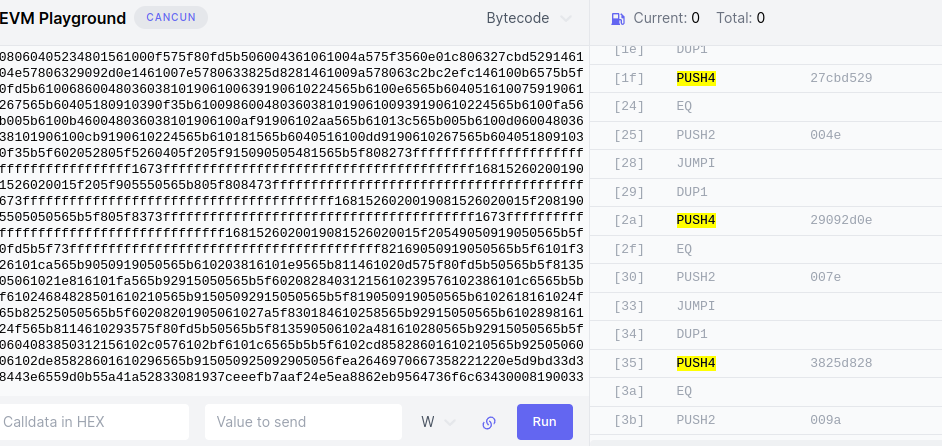
Found the 4 instances of PUSH4 as below.
27cbd529
29092d0e
3825d828
c2bc2efc
Lets try to get the function signatures for each of the above function hash. We will use the cast tool from foundry to retrieve the function signatures.
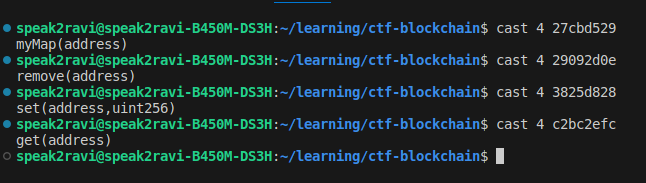
We are interested in the below functions.
a) remove(address)
b) set(address, uint256)
c) get(address)
CallData
calldata is an encoded chunk of hexadecimal numbers that contains information about what function of the contract we want to call, and it’s arguments or data.
1) Call Set Function
Lets call set function with below parameters
The input data packed will have to be packed with the below information
a) encoded function signature
set(address, uint256) : 0x3825d828
b) parameters
address : 0xAb8483F64d9C6d1EcF9b849Ae677dD3315835cb2

uint256  : 25
Build the encoded call data packed for set function which will be as below.
0x3825d828000000000000000000000000ab8483f64d9c6d1ecf9b849ae677dd3315835cb20000000000000000000000000000000000000000000000000000000000000019
Pass this value in call-data and observe the state transition on the EVM storage in the playground.
You should see value as 19 on the slot in the storage. 19 is hex representation of 25 which is accurate.
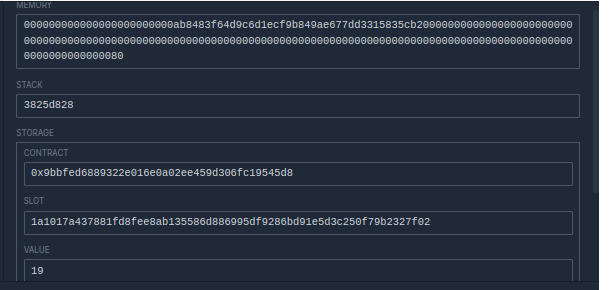
2) Call Get Function
Lets call the get function now.
The input data packed will have to be packed with the below information
a) encoded function signature
set(address, uint256) : 0xc2bc2efc
b) parameters
address: ab8483f64d9c6d1ecf9b849ae677dd3315835cb2
Similar to above, encoded call data packed for get function which will be as below.
0xc2bc2efc000000000000000000000000ab8483f64d9c6d1ecf9b849ae677dd3315835cb2
Pass this packed call data and observe the state changes in the EVM playground.
Summary:
In this exercise, we learnt a few key concepts that are crucial to our ability to read functionality in bytecode for smart contract.
a) There are two bytecodes generated, one for initialisation which is primarily the constructor call and the second is the deployed bytecode.
b) EVM always starts from 0th instruction and flows through using the JUMP, STOP , REVERT and RETURN.
c) Only public and external functions are part of the interface and hence we can identify the potential entry points to the contract using the push4 opcodes.
d) Learnt to build the calldata looking at the function signature.
Next steps to further enhance our understanding are to
a) Annotate the flow of the function by going over the sequence of instruction to understand the logic in the function
b) Pay attention to how memory pointer, stack, memory and storage are used during the life cycle of the function call.